The redirect plan: an essential phase that Swan will simplify.
The redirect plan is the list of URLs that maps the old URLs to the new ones. Building a redirect plan for every URL is essential to avoid losing, or at least to limit the loss of, traffic…
The redirect plan is the list of URLs that maps the old URLs to the new ones. Building a redirect plan for every URL is essential to avoid losing, or at least to limit the loss of, SEO traffic when migrating a website. It is one of the main causes of SEO loss in the life of a website. You do not know what a 301 redirect is, or you dread the amount of work involved? Do not panic, Swan is the solution you need!
Why is building your redirect plan with swan.tools so simple?
Swan.tools is the first SEO tool in the world to help you build a redirect plan by guiding you through the creation of an exhaustive list of URLs to redirect, and also by automatically suggesting how to match them with one another. No more tedious work with long Excel files to get your URL redirect plan. Read our article "ChatGPT vs swan.tool for a quality website migration" to discover the advantages of a tool as complete as Swan.
When should you build the migration plan of a website during a redesign?
Whether or not you use Swan, it is essential to build this redirect plan before migrating your website to production. Ideally, build the redirect plan when your future site is already available in a test or staging environment with all its pages, and your old version is still live in production. The redirect plan is a crucial step in your website SEO migration checklist. It will let you easily compare the versions of the pages in case of doubt, rather than comparing only the URL labels.
Are you about to start a migration or are you beginning your redirect plan? Contact us to find out more about Swan.
When do you need a redirect plan?
A redirect plan is useful as soon as the format of a URL changes, whether it is an internal URL or even the whole domain name. It cannot be said often enough: the ideal is not to change the URLs at all.
What is the redirect plan for, from a technical point of view?
The redirect plan is used to set up 301 redirects from the old URLs to the new URLs. We are talking here about permanent redirects (301), not temporary redirects (302).
The web, as Google classifies it, is based on the way pages link to one another. Setting up redirects for these pages lets Google transfer the popularity of each URL (what we call PageRank) from the old URL to the new one.
NB: PageRank (named after Larry Page) is one of the patents most analysed by SEOs since its publication.
Seize the opportunity to optimise your online presence: Swan.tools is the ideal ally for an effective SEO migration, ensuring a smooth transition of your data while boosting your visibility.
Where should the redirect plan be installed?
The redirect plan must be installed where the domain name you want to redirect points. Even though there are several ways to set up redirects in Magento or any other CMS, this detail matters. If that domain is on a different server from the final site, it is on the original site that the plan must be installed, otherwise no URL will benefit from the configured redirects. On a WordPress site, see our guide to redirects in WordPress.
As for the file location, contrary to common belief, it is better to avoid putting the URL redirect plan in the .htaccess and to prefer the VHOST level. The vhost is stored in the server's RAM, whereas the .htaccess requires a file access which, even in the age of SSDs, is necessarily slower to reach the line of the right redirect. (Note that this option will not be available if you are on shared hosting.)
The steps to create a redirect plan
Creating a redirect plan for your URLs involves several structuring steps.
Step 1: list the URLs of the old and the new site
It may seem obvious, but you have to start with an inventory of the URLs concerned. And this inventory must be meticulous. To identify as many URLs as possible, it is worth using a crawler (such as Screaming Frog), Google tools such as Search Console (performance tab AND backlinks tab) or Google Analytics (for organic traffic), log analysis tools, as well as backlink and traffic tracking tools such as Ahrefs, Babbar, Semrush, etc.
If you use all of these tools, you can import all the data into Swan and be certain not to forget any URL in your redirect plan. To estimate the costs of your project as accurately as possible, visit our section on the pricing of Swan Tools, where you will find detailed information.
NB: Swan also lets you import Search Console and Google Analytics data directly through their API in a few clicks.
Step 2: decide which URLs to leave out of the redirect plan
Not all URLs are necessarily relevant for your redirect plan. Keeping them costs you nothing but time, but you can take the opportunity to do some tidying up.
The advantage of Swan is that in a few clicks you can either set them to 410 or match them with whatever is the most logical semantically. No more time-consuming headaches redirecting URLs with little added value.
Here are a few examples of URL types that can be purged during a redirect plan:
- URLs that generate no traffic
- URLs with endless parameters (e-commerce facets, for example), especially if they have neither traffic nor backlinks
- Pagination URLs
- URLs that rank for no keyword
Step 3: matching the URLs
This is the longest step if you do not use Swan: each old URL you keep must be matched with a new URL. Without Swan, this means knowing the site inside out, and frankly this step has already traumatised hundreds of interns in many companies, for an uncertain result in the end.
With Swan, you can get for each URL the top 3 semantically closest URLs in a few seconds. This lets you build your redirect plan with unrivalled speed and precision.
Step 4: test the URL redirect plan
This is where you upload your redirect plan (Apache or Nginx) to your site. We recommend doing this step in staging first. You can check here that it contains no errors, and test whether each old URL is correctly redirected in your plan.
Once again, Swan performs this step automatically.
Step 5: check again several months later
This step is often overlooked, but you should make sure your redirect plan stays in place for the whole life of your site, including during a new migration. The appearance of 404 or 503 errors when accessing the old URLs could have a significant impact on your rankings.
Do not let your redirect plan become a headache. Choose Swan for an automated and intelligent approach to URL redirection, guaranteeing a smooth and secure transition for your online presence.
Which URLs should be redirected first?
With a tool like Swan, you will no longer have to make this agonising SEO trade-off, such as redirecting a PDF file or redirecting an image. However, if you do not use Swan and you are in a hurry, I would advise you to migrate these 3 types of URL first:
- The URLs that bring you the most business; you certainly already know them inside out.
- The top 10 URLs that generate the most traffic (in Google Analytics, for example).
- The URLs that receive backlinks.
How to export a redirect plan to Excel for reporting?
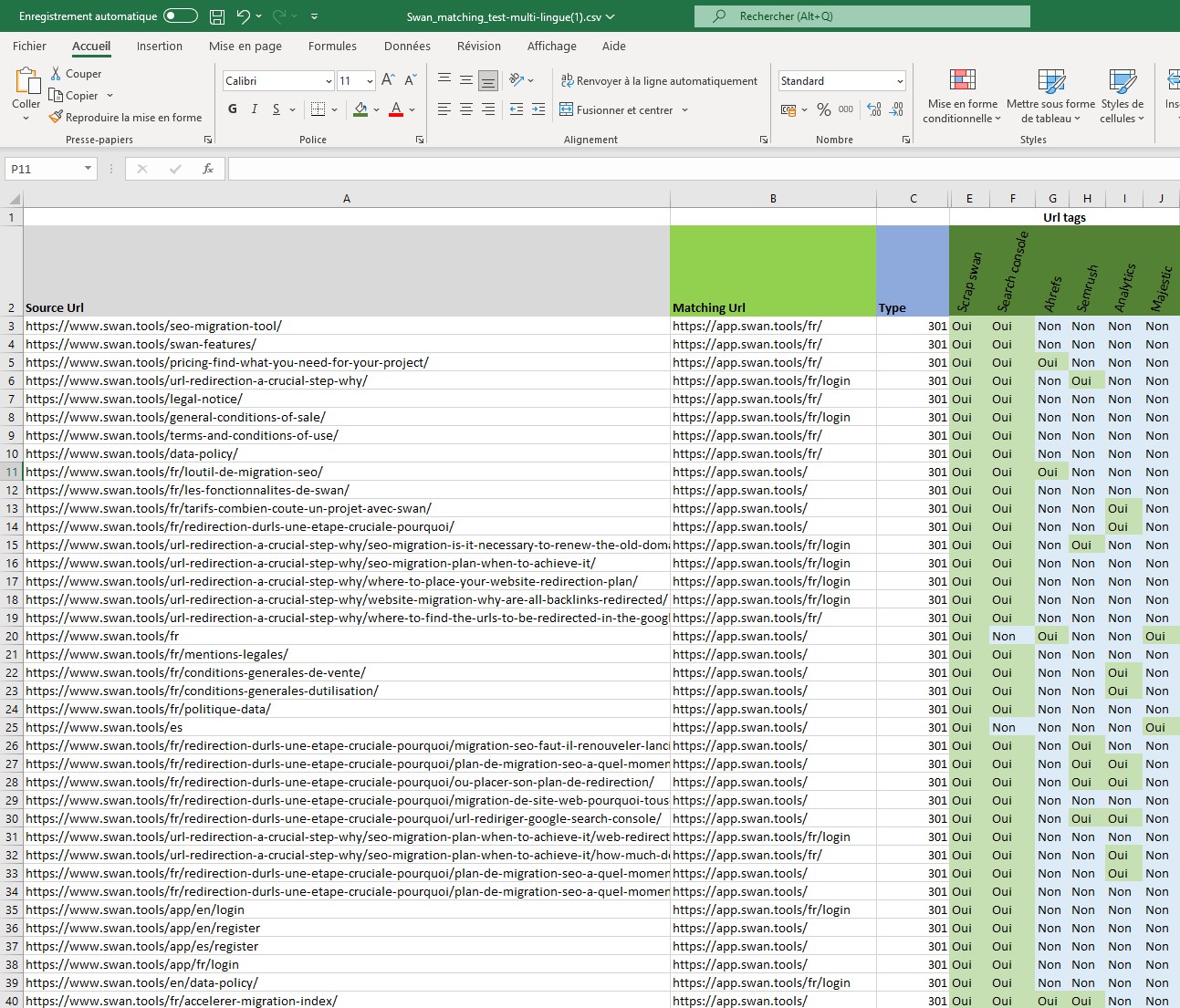
Once your redirect plan is done in Swan, you will need to report to your manager or your client. They are often used to seeing it in Microsoft Excel.
Example of a redirect plan exported from swan for reporting
Find out how to produce quality reporting for your redirect plans with this video:
With this tutorial, you will see how to export the redirect plan of your website migration along with all the related URL tags. You will then be able to say, for each URL in your plan, what its acquisition source or sources were, and produce accurate reporting. Once again, Swan saves you time so you can focus on advising your client and on monitoring the migration over time.
A winning redirect plan

As you can see on the chart, if you do not set up an optimised redirect plan, you immediately expose yourself to a loss of traffic. In this example, the site lost an average of 40 positions in just two days. Fortunately, thanks to a precise redirect plan, traffic recovered quickly. In the end, by using our Swan tool, you avoid going through the dip in rankings that is so typical of website migrations.
For the management of your redirect plans, experience a complex process made simple with Swan, for a successful migration of your website.
How to speed up the processing of a redirect plan?
Setting up a redirect plan alone is not enough to speed up its processing by search engines.
Our SEO strategy advice to optimise its effectiveness is to add an HTML sitemap accessible from the footer of your site, and to include in it href links to all the old URLs as well as to the new URLs.
You will thus force Google to discover (crawl, in technical SEO language) the change to the new URLs as well as the redirects of the old ones. Find out more in our complete tutorial on building an HTML sitemap to speed up the processing of the redirect plan. Note that to optimise your SEO, once the migration is complete (allow about 3 months), it is perfectly relevant to keep the new URLs section in the HTML sitemap. Do not forget to force the indexing of the URL of this HTML sitemap in Google Search Console. We are talking about an HTML sitemap, not an XML one.
If you change domain, you can also try to declare the change in Search Console.
How long should URL redirects be kept in place?
There is no single valid answer to this question for every case, which is why we have provided the answer in a detailed article based on a real case. Discover the 2 cases to know how long redirects must be kept in place.