Old website analysis
- Full crawl of the old version
- Import of URLs from Search Console
- Import of exports from your SEO tools or a CSV
- Manual addition of forgotten addresses
SEO migration · since 2020
Swan crawls the old version of your website and the new one, matches each page with its replacement, lets you decide the doubtful cases, then checks the redirects before and after go-live. Without writing a single line of code.
cap-referencement.fr/prestations/audit-seoagence-orbite.fr/services/audit-seocap-referencement.fr/blog/maillage-interne-seoagence-orbite.fr/ressources/blog/strategie-maillage-internecap-referencement.fr/promo-rentree-2021No equivalent pageThe same order as your project: collect, match, test on staging, confirm in production.
Create a project, enter the old domain and the staging of the new one, and let Swan crawl. The first redirect plan arrives while you have your coffee; all that is left are the cases where a human decision matters.
The matching engine compares the content of pages, not just their addresses: a renamed product, a moved article or a merged category all find their destination.
« J’ai gagné un temps fou pour une migration et les résultats sont bluffants. »« You should take a look at Swan if you want to take away the headache during site migration. The demo I saw blew me away. »« Un outil novateur et à suivre ! Longue vie à Swan ! »A migration project costs 4 credits and covers 1,000 URLs per domain; beyond that, 1 credit adds 250 URLs. The price per credit drops with the quantity purchased.
During a redesign, the fear of losing traffic is justified. Swan helps you avoid the most costly mistakes:
Swan works out which URLs of the old website to connect to the new one, with a similarity rate between pages. Here is how, screen by screen. Read the complete SEO migration guide
Matching
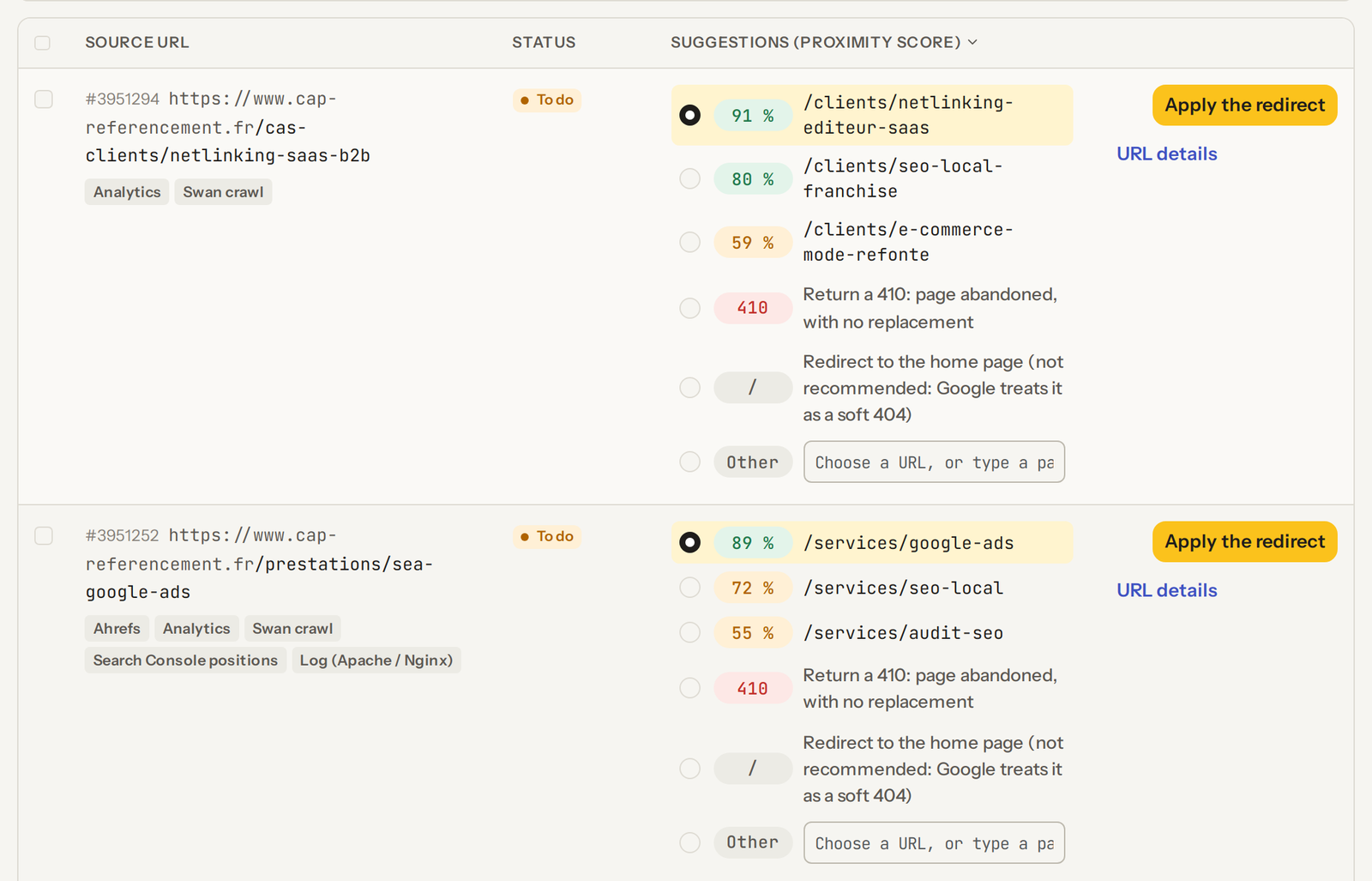
For each page of the old website, Swan reads the content and suggests the three pages of the new website that look most like it, with a similarity score.
66% of redirects found on the first try. Across 1,438 redirects approved by hand in four real migrations, the page that was kept is Swan's first suggestion two times out of three, against 13% for the 2020 engine.
The best one is preselected: you approve it, pick another suggestion, type an address or mark the page as 410. Obvious cases go quickly, and your time goes to the doubtful ones.
Example: migrating an SEO agency's website to the website of the agency that took it over.

Bulk actions
Select the URLs, choose the action, then the scope.
Completeness
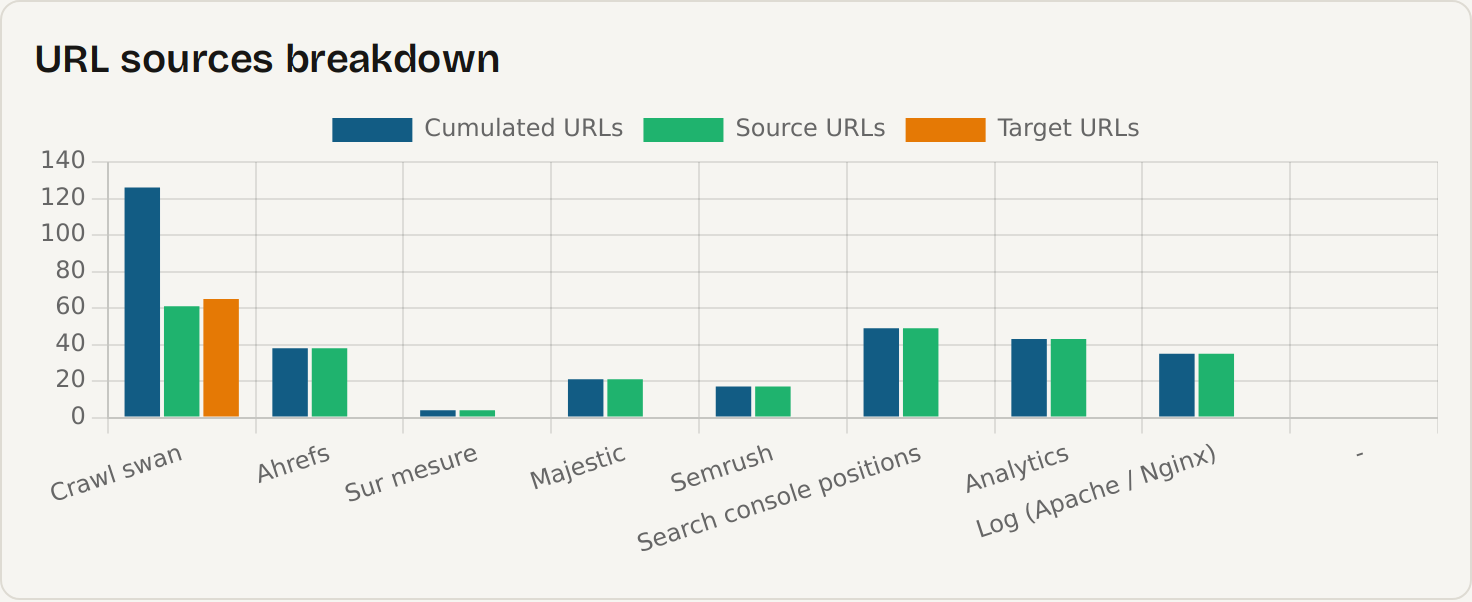
A crawl only sees pages that are linked to each other. The URLs that matter are sometimes elsewhere.
An orphan page that still receives backlinks, an old article that still ranks in Google, an address only the logs know about: each one becomes a 404 after go-live if nobody listed it.
Swan combines the crawl with Search Console, Google Analytics, Ahrefs, Majestic and Semrush exports, server logs and your own lists. Every URL keeps track of its source: you see at a glance what the crawl alone would have missed.
Semantic similarity
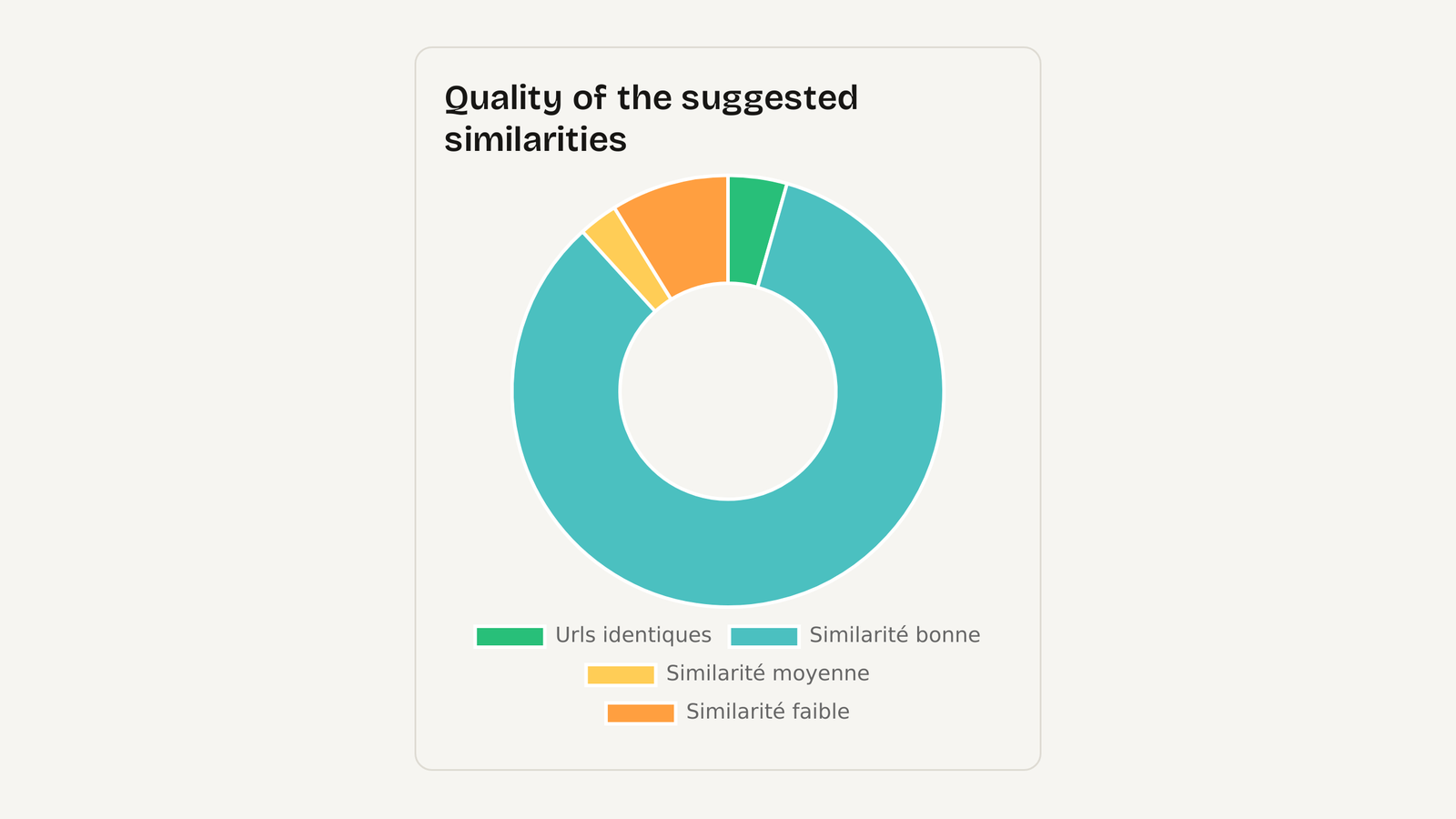
This chart breaks down the matches by similarity: identical URLs, good, medium or low similarity.
It is an estimate of the semantic similarity to come between the old website and the new one, page by page. The higher the share of good similarities, the more Google will find in the new page what it ranked in the old one, and the more likely your traffic is to follow.
A low share points to lost or heavily rewritten content: deal with it before go-live, not three months later while watching the curve drop.
Assistant
At the top of every screen, Swan tells you where the project stands and what the next action is: crawl, match, test, validate.

Project tracking
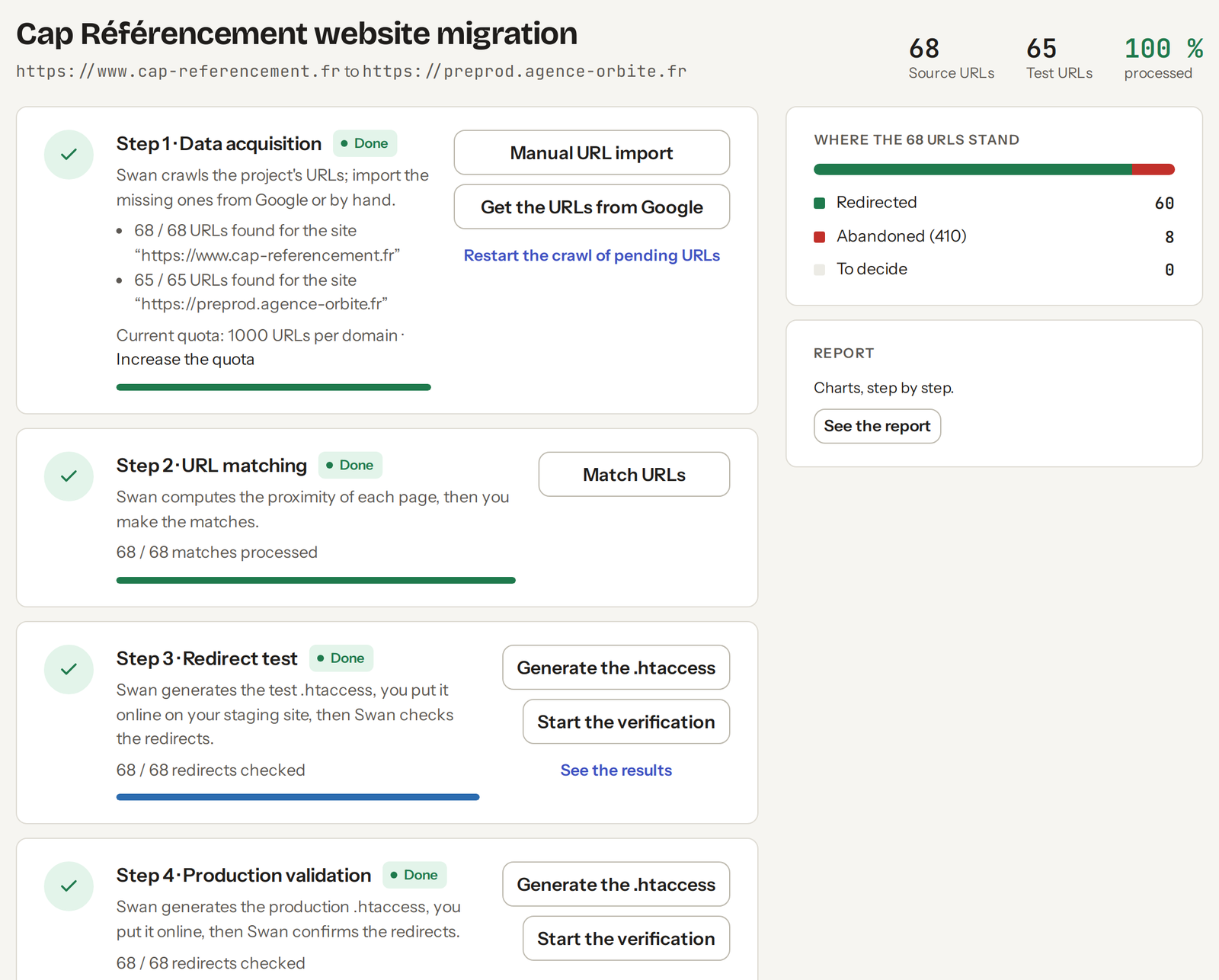
A migration takes several weeks and several people: the SEO specialist, the developer, the client.
The steps screen shows everyone where the project stands: URLs collected, matches handled, redirects checked, validation in production. What is still to be decided is in plain sight.
Nothing is discovered the day before go-live, and the final report rests on figures, not on impressions.
Staging, then production
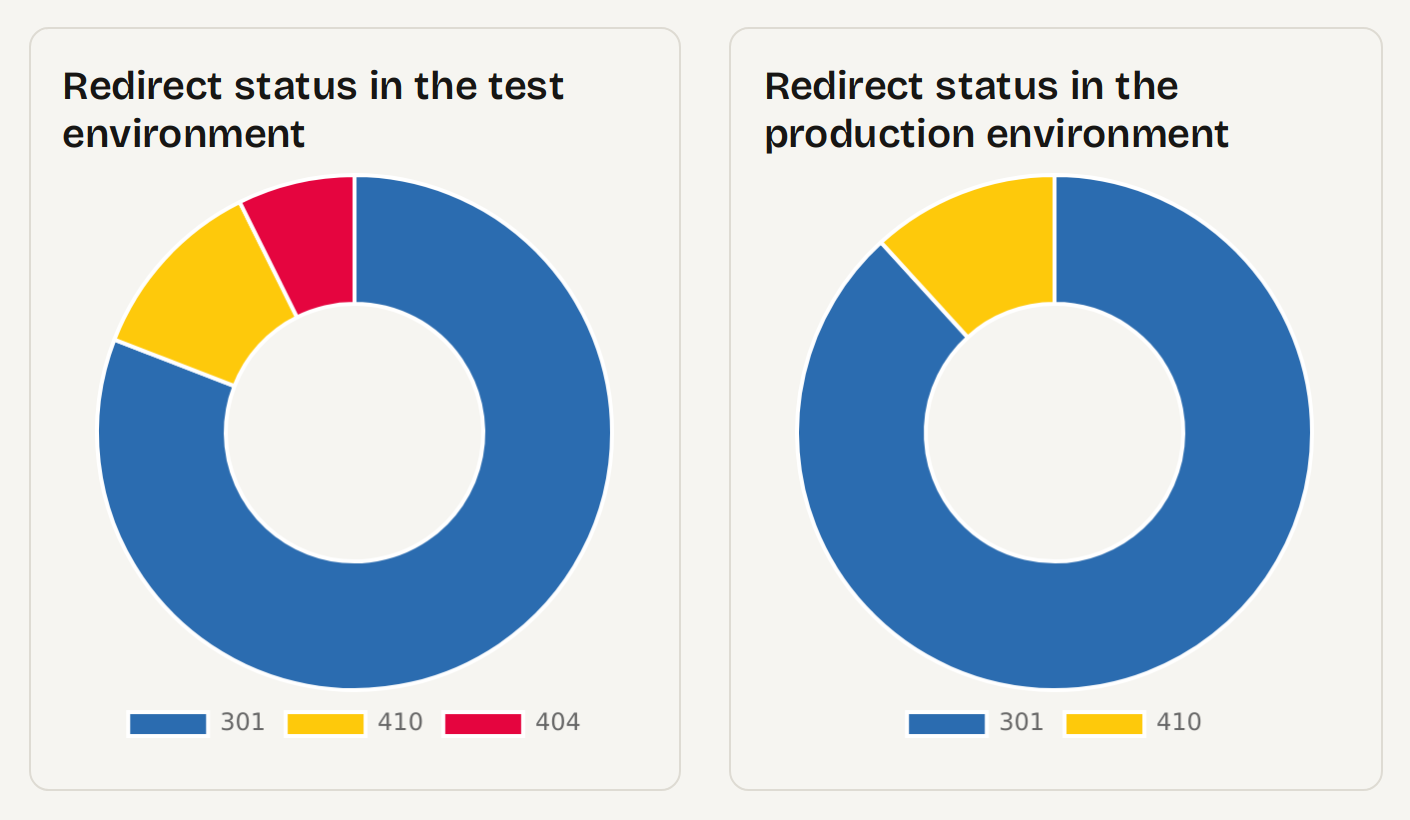
Swan generates the redirect rules; you put them on staging, and Swan checks every URL.
A redirect that leads to a 404 is then fixed before Google ever sees it. After go-live, the same check runs again in production: were the rules copied correctly, does the server apply them all?
The two charts side by side are the proof: what worked in testing also works live, and the migration was carried through to the end.
URL by URL check
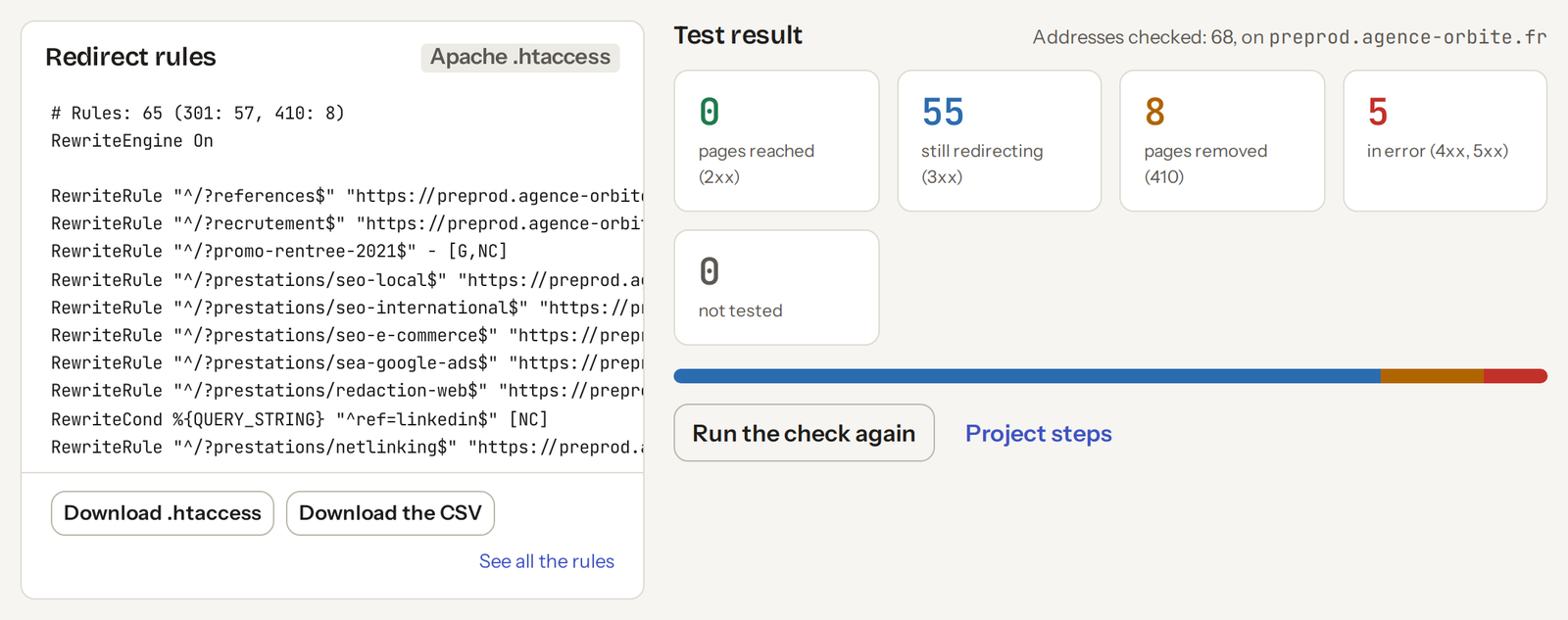
The Apache rules (.htaccess) and the CSV plan are ready to deploy.
The test result sorts every address: redirected, removed with a 410, in error or not yet tested. Errors can be filtered in one click and fixed in the matching screen, then the check runs again.
Blog
How to write a 301 or 302 redirect in the .htaccess file, which directive to choose (Redirect, RedirectMatch or RewriteRule), and the common cases: domain change, HTTPS, home page, WordPress.
Today, efficiency and simplicity are the watchwords when running an online store. That is why many online shops are moving from PrestaShop to Shopify, known for its…
Redirects have become an essential tool for maintaining the integrity and effectiveness of your WordPress website. Whether you are changing a URL, updating the content of a page, switching CMS, or…
Create an account and start the crawl: the first redirect plan arrives within minutes.