How to deindex URLs from Google after a hack?
If you have recently been hacked, you have noticed many extra URLs in Google, created to mass-spam the search engine's index.
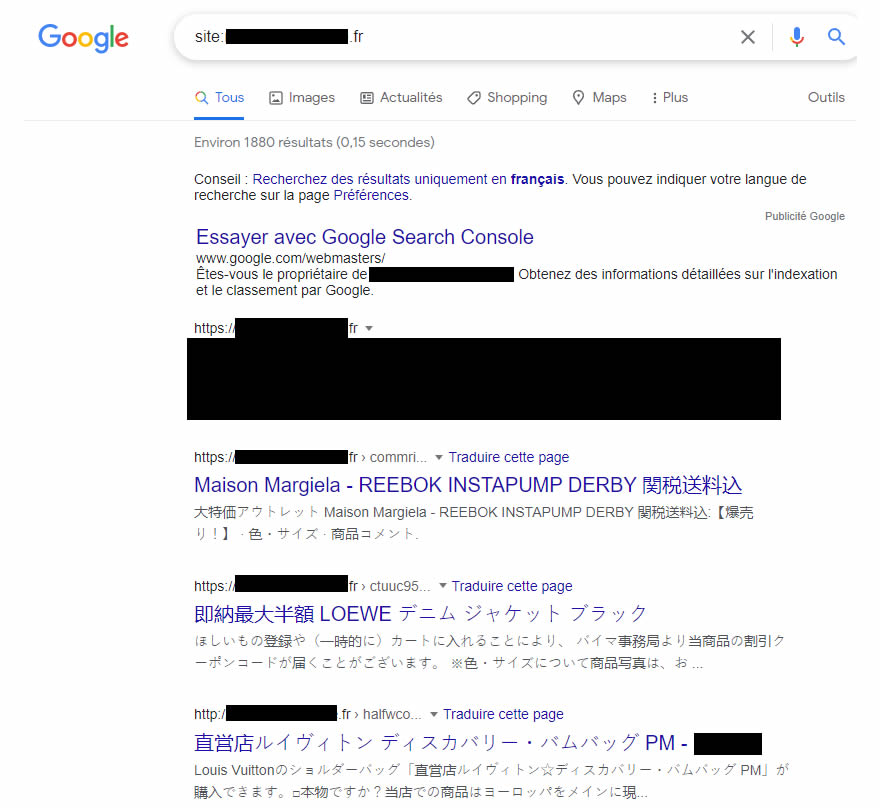
If you have recently been hacked, you have noticed many extra URLs in Google, created to mass-spam the search engine's index.
Prerequisite: clean up your WordPress
This is clearly not the subject of this post, but it is important to start by cleaning up the FTP and the database.
Ideally, start again from a clean set of files and data dating from before the hack (hence the importance of making backups) and make sure you patch the vulnerability that let the hacker in. Take the opportunity to change the passwords (at the very least the back office users and MySQL).
The idea here is to prevent the incident from happening again a few days later.
Identify the format of the hacked URLs' "pattern"
What many automated spam systems have in common is that they generate URLs that all look more or less alike. By this we mean that the content of the slug follows a rule that can be reproduced with a regular expression. I can see those at the back starting to sweat: yes, we are going to write regex, but we will keep it simple.
To find this pattern, let us start with a site: search in Google. As a reminder, the site:domain-name command returns all the URLs of the site that are indexed. Example: site:swan.tools

list of hacked URLs in Google using the site: command
On this example site, we find these URLs, for instance:
- https://nom-de-domaine.fr/conmrixzp741732
- https://nom-de-domaine.fr/ctuuc961439
- http://nom-de-domaine.fr/haxfwcowv6881
- http://nom-de-domaine.fr/chlwfzkle658271
- http://nom-de-domaine.fr/fjsxt794539
- http://nom-de-domaine.fr/ngogtvudqw9573192
The list is of course not exhaustive, and I deliberately changed a few letters so that you cannot too easily identify the unfortunate owner who kindly lent me their case for this tutorial.
We notice here that the URL (slug) of each hacked page starts with a series of letters followed by a series of digits. That is what a pattern is (quite simply).
From there, we will try to identify the variations by finding a rule that will not cover the legitimate URLs of our website, but there should be no problem here.
In our case, we see that the URL starts with 5 to 10 letters followed by a series of 4 to 7 digits, depending on the URL.
Our regular expression will therefore be this one:
^[a-z]{5,10}\d{4,7}$
Note that you can widen the character count ranges as long as there is no risk of matching a legitimate URL of your site.
Prepare the redirect rule for Apache
We are going to prepare a rule here that will have two effects:
- Tell Google that the page has disappeared
- Ask Google not to keep this page in its index
RewriteRule ^[a-z]{5,10}\d{4,7}$ - [E=NOINDEXNOFOLLOW,G]

Header always set X-Robots-Tag "noindex, nofollow" env=NOINDEXNOFOLLOW
If these lines do not work (for example on the cPanel of a well-known French hosting provider), you need to add the definition of the 410 document at the beginning of the file, which gives this:
<IfModule mod_rewrite.c>

        RewriteEngine On

	RewriteBase /

	ErrorDocument 410 default

	RewriteRule ^[a-z]{5,10}\d{4,7}$ - [E=NOINDEXNOFOLLOW,G,END]

	Header always set X-Robots-Tag "noindex, nofollow" env=NOINDEXNOFOLLOW

</IfModule>
In the first line we find our regex to identify the URLs concerned; then, as you can see, we do not specify a redirect URL but a simple "-". Combined with the letter G in the flag section on the right, it says that the URL is Gone. This is the famous 410 code, which says that the URL will never come back and is not redirected. The E= flag is used here to define an environment variable that we call NOINDEXNOFOLLOW (the label is arbitrary here); we could have called it toto and it would work just as well.
In the second line, we state that we still send an X-Robots-Tag "noindex, nofollow" HTTP header, which acts like a robots meta tag in the HTML head. Except that here, we do not need to modify the site's source code.
Ideally, you should therefore place these 2 lines at the beginning of your .htaccess file, right after the RewriteEngine On line.
If you want to go further, for example by speeding up processing, you can create a complete sitemap of these URLs or an HTML sitemap by following, for example, this tutorial on speeding up the processing of a redirect plan. To limit the risk of another attack, see also how to identify a secure website and our guide to the HTTPS protocol.